Write a text conversation message by message, then save it as a screenshot, or as a video where your green bubbles rise from the message field and, in RCS, theirs come in after the typing bubble.
Unlimited downloads.
Videos carry a small watermark.
01 / Templates
Text message templates.
Texts that turn green when a friend gets a new phone, Grandpa’s very first text, a dog groomer with a bath photo, a babysitter on date night, a stranger with an umbrella. Pick one and make it yours: every word, name and photo is editable. Or start from a blank chat.
-
Why is it green?
Your best friend gets a new phone and your texts turn green. Eleven years of blue, one sunset photo and a verdict. Made for skits.
-
Grandpa’s first text
Grandpa’s very first text, in capitals and signed. Then he signs OK too. No typing dots, no Read, just the wait. Made for family storytime.
-
Grooming day
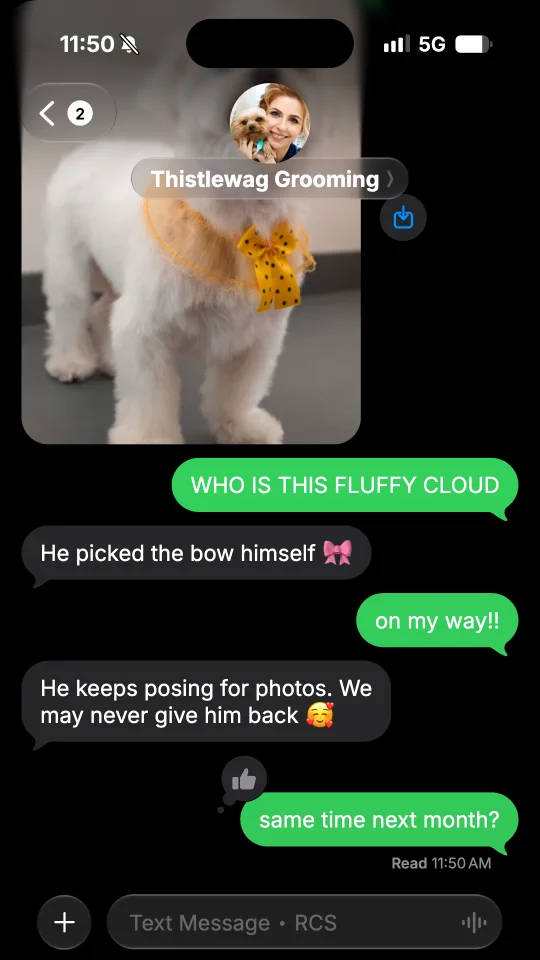
A dog groomer texts the owner a bath photo, then the fluffy result, and books the next visit. Made for groomers, salons and pet shops.
-
Babysitter update
Date night. The babysitter texts: dinner, a broccoli plot, a secret fort with a password, two kids asleep. Made for parents and babysitters.
-
The umbrella
A stranger lends you an umbrella at the bus stop and you take their number. Days later: bad news, a better umbrella and a coffee. Made for meet-cutes.
02 / What you can add
The details of a text conversation.
-
Green bubbles
Their texts in grey bubbles, yours in green ones that change shade with their place on the screen, with the tail under the last bubble of each run, as in the Messages app of an iPhone.
-
RCS or plain SMS
In RCS, the chat shows the typing bubble while they write and Delivered under your last text. Turn RCS off for a plain SMS: no typing bubble and nothing under your texts.
-
Read with its time
In RCS, read receipts turn Delivered into Read with its time once they have read it. Turn them off and it stays Delivered.
-
Reactions
Put a heart, a thumbs up or down, HAHA, !!, ? or any emoji on a text, theirs or yours.
-
Photos and voice messages
Send a photo with round corners, a big emoji on its own, or a voice message with its waveform and its length.
-
Contact, times, dark or light
The name and photo of the contact, or their initials, an unread count on the back button, and times such as Yesterday 9:30 PM between the texts, in dark or light mode.
03 / Ideas
What people make with a fake text conversation.
Green bubbles mean a plain text: a wrong number, a delivery, a grandparent with a first phone.
-
Storytime videos
A text from a wrong number, a first text from Grandpa, a plan gone wrong: tell it text by text for TikTok, reels or Shorts.
-
Funny screenshots
Save a screenshot of a funny exchange with a heart or HAHA on the punchline, ready to post or to send.
-
Brand and service mockups
Show an order update or a booking reminder in an ad, a website or a design mockup.
-
Lessons about scam texts
Show what a scam text looks like in a slide or a lesson about online safety, with no real number in it.
04 / How it works
Your text conversation in one minute.
-
Pick a template or start blank
Start from a ready-made text conversation, or from an empty one with a new contact.
-
Type it like a text
Tap Me or Them to switch sides. Add photos, voice messages, reactions, times and pauses. Choose RCS or a plain SMS in Settings.
-
Save and post
Save a PNG screenshot, or a video sized for TikTok, stories and reels. On a phone, tap Share to post it or send it in a chat.
05 / FAQ
Text message questions
How do I make a fake text message?
Tap Start free or pick a template. Type the messages like a text, and tap Me or Them to switch sides. Set the name and photo of the contact, choose RCS or a plain SMS in Settings, then save the chat as a PNG screenshot or as a video. No account is needed.
Is this fake text message generator free?
Yes. Screenshots are free PNG images with no watermark, and you can download as many as you like. Videos are free too, with a small watermark and a short end card.
Why are the bubbles green and not blue?
On an iPhone, blue bubbles are iMessages, and green bubbles are text messages, in RCS or SMS, such as texts to a phone without iMessage. This page makes the green ones; for blue bubbles, open the fake iMessage generator.
RCS or SMS: what changes?
A new chat is in RCS: the top of the chat and the message field say RCS, the typing bubble shows while they write, and Delivered shows under your last text, then Read with its time when read receipts are on. Turn RCS off in Settings for a plain SMS: the chat says SMS, with no typing bubble and nothing under your texts.
What can a fake text conversation show?
Texts in green and grey bubbles, photos, voice messages, reactions such as a heart or HAHA, big emoji on their own, times such as Today or Yesterday, an unread count on the back button and a city under the name, in dark or light mode. A video can start on an empty chat, or in the middle of a conversation that already has messages.
Which sizes work for TikTok, stories and reels?
Story 9:16 for TikTok videos, stories and reels, Feed 4:5 and Square 1:1 for posts, all 1080 pixels wide. Screenshots are PNG images. Videos are MP4 with sound, or WebM on some browsers.
How do I make a fake text conversation look real?
Give the contact a name and a photo, or leave their initials, and choose RCS or a plain SMS in Settings. In RCS, the typing bubble shows while they write, and read receipts turn Delivered into Read with its time. Add a time between the texts, and set the clock of the status bar in Settings.
Is FakeDM.app made by Apple or a phone carrier?
No. FakeDM.app is an independent tool for making mockups, it is not affiliated with, endorsed or sponsored by Apple or by any phone carrier, and it sends no text message. What you make is a mockup, not a real message: do not use it to impersonate anyone, to fake evidence or to deceive people. See the acceptable use rules.