Type an iMessage chat like a text, then save it as a screenshot, or as a video where your blue bubbles rise from the message field, their typing bubble pops in, and Delivered turns to Read.
Unlimited downloads.
Videos carry a small watermark.
01 / Templates
iMessage templates.
Dad discovering reactions, a partner who cannot come this weekend, two friends in a ticket queue, a puppy that was only going to be looked at, a 2 AM landing. Pick one and make it yours: every word, name and photo is editable. Or start from a blank chat.
-
Dad found the reactions
You tell Dad you got the job: thumbs up. You are moving to the moon: thumbs up. Then he finds the other reactions. Made for family skits.
-
Look outside
A long-distance partner cannot make it this weekend. But look under their name at the top of the chat. Made for couples and storytime.
-
Ticket queue
Two best friends wait for tickets: one is number 48,112 in line, the other number 12. Then two voice messages of screaming. Made for concerts.
-
Don’t be mad
Your roommate went to the shelter just to look. Two photos and two voice messages later, Waffles lives with you. Made for pet accounts and shelters.
-
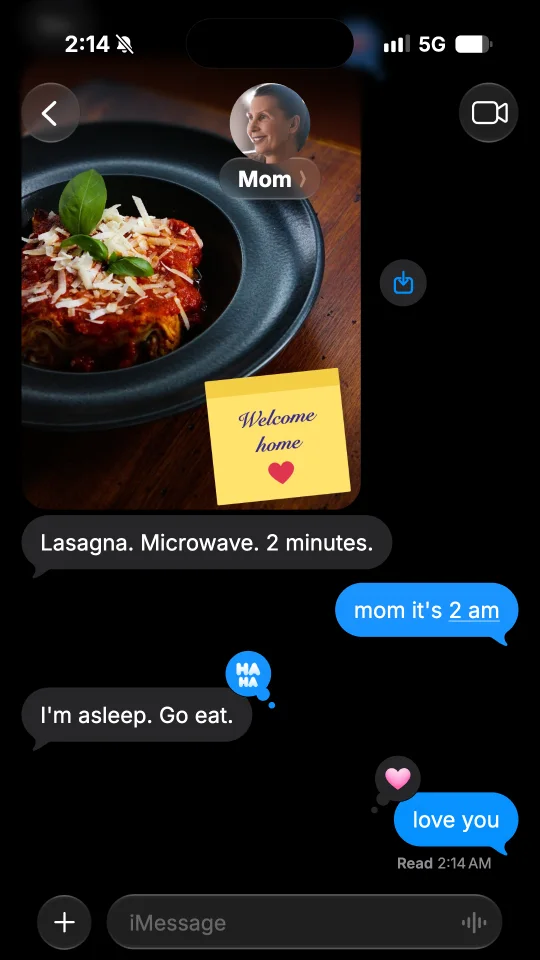
Don’t wait up
You land at 2 AM and tell Mom not to wait up. Read 2:14 AM, right away. Then silence, then a photo of a plate. Made for storytime.
02 / What you can add
The details of an iMessage chat.
-
Contact and top bar
The photo of the contact over their name, or their initials when there is no photo, between the back button and the video button. The back button can show your unread chats, and a line under the name the city they share their location from.
-
Blue bubbles
Their messages in grey bubbles, yours in blue ones that change shade with their place on the screen, with the tail under the last bubble of each run. Big emoji stand on their own, and web addresses and times are underlined.
-
Delivered and Read
Delivered shows under your last message. Turn on read receipts and it turns to Read with its time once they have read it.
-
Reactions
Put a heart, a thumbs up or down, HAHA, !!, ? or any emoji on a message, theirs or yours.
-
Voice messages and photos
A voice message with its play button, its waveform and its length, like 00:07, with Keep under yours, and photos with round corners.
-
Typing bubble, times, dark or light
While they type, the typing bubble pops in. Times such as Today 9:41 AM sit between the messages, in dark or light mode.
03 / Ideas
What people make with a fake iMessage.
Blue bubbles, tapbacks and Read under the last message: an iMessage is the chat everyone knows at a glance.
-
Storytime videos
A text from Mom, a wrong number, a message left on Read: tell it bubble by bubble for TikTok, reels or Shorts.
-
Funny screenshots
Save a screenshot of a funny exchange with HAHA or a heart on the punchline, ready to post or to send to a friend.
-
Skits and sketches
Write both sides of a sketch for your channel, then post the video, with the typing bubble before each reply.
-
Brand and app mockups
Show a text from your brand, an order update or a reminder in an ad, a website or a pitch, in dark or light mode.
04 / How it works
Your iMessage in one minute.
-
Pick a template or start blank
Start from a ready-made iMessage chat, or from an empty one with a new contact.
-
Type it like a text
Tap Me or Them to switch sides. Add photos, voice messages, reactions, times and pauses. Set the name and photo of the contact, or keep their initials.
-
Save and post
Save a PNG screenshot, or a video sized for TikTok, stories and reels. On a phone, tap Share to post it or send it in a chat.
05 / FAQ
iMessage questions
How do I make a fake iMessage?
Tap Start free or pick a template. Type the messages like a text, and tap Me or Them to switch sides. Set the name and photo of the contact, or keep their initials, then save the chat as a PNG screenshot or as a video. No account is needed.
Is this fake iMessage generator free?
Yes. Screenshots are free PNG images with no watermark, and you can download as many as you like. Videos are free too, with a small watermark and a short end card.
What can a fake iMessage chat show?
Text messages in blue and grey bubbles with their tails, photos, voice messages with Keep under yours, reactions, big emoji on their own, times such as Today or Yesterday, the typing bubble, and Delivered or Read under your last message, in dark or light mode. The back button can show a count of unread chats, and a line under the name the city of the contact. A video can start on an empty chat, or in the middle of a conversation that already has messages.
Can it show Read with a time, or only Delivered?
Both. Delivered shows under your last message. In Settings, turn on Read receipts and it turns to Read with its time once they have read it, like Read 9:41 AM: the time of the status bar, which you set in Settings, under Status bar. Off, it stays Delivered.
Can I add reactions like HAHA or a heart?
Yes. Tap a message, then React, and pick a heart, a thumbs up or down, HAHA, !! or ?, or up to three emoji of your own, on their messages or yours. In a video, each one pops on once the message has been read.
Can I make green bubbles instead?
Yes. Open the fake text message generator, or switch the app of your chat to SMS in Settings: it keeps every message and setting, with your bubbles in green.
How do I make a fake iMessage look real?
Give the contact a photo and a name, or leave their initials. Put a reaction on a message, turn on read receipts so Delivered turns to Read with its time, and add a time such as Today 9:41 AM between the messages. Set the clock of the status bar in Settings.
Is FakeDM.app made by Apple?
No. FakeDM.app is an independent tool for making mockups, and it is not affiliated with, endorsed or sponsored by Apple. What you make is a mockup, not a real message: do not use it to impersonate anyone, to fake evidence or to deceive people. See the acceptable use rules.