Type a Snapchat chat like a text, then save it as a screenshot, or as a video where each message lands under its name, yours grey for a beat once sent, and the chat jumps to the newest one.
Unlimited downloads.
Videos carry a small watermark.
01 / Templates
Snapchat templates.
A friend on the wrong bus, a jacket left at a party, a snow day, the front row of a concert and a home baker’s cinnamon rolls. Pick one and make it yours: every word, name and photo is editable. Or start from a blank chat.
-
Wrong bus
Class has started and your friend swears she is on the bus. Then she sends a photo of cows. Made for school skits and late friends.
-
The jacket
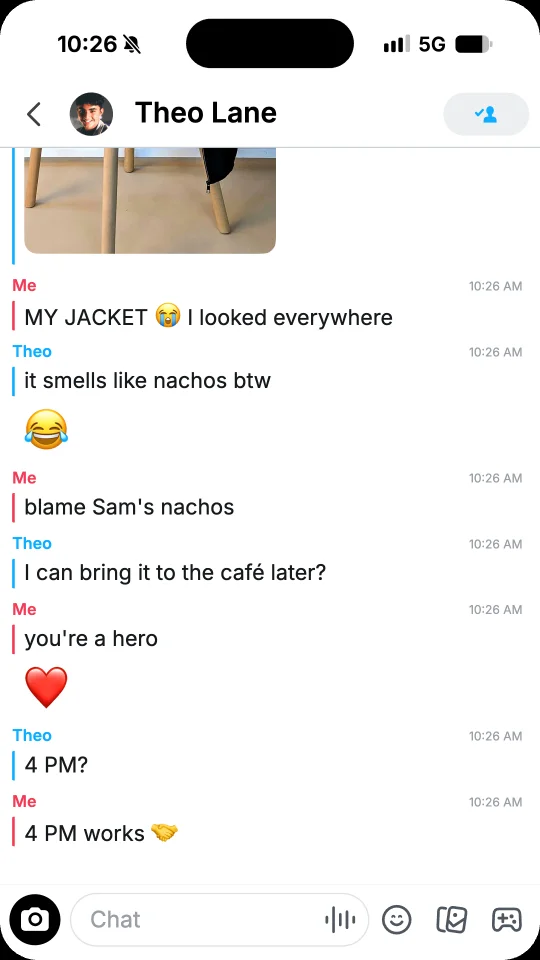
Someone from last night’s party adds you: you left your jacket there. A photo, a voice note and a plan to meet. Made for party stories.
-
Snow day
Snow came overnight and school is closed. Your best friend has a sledding plan before you are even awake. Made for winter skits.
-
Front row
Your friend made it to the front row and sends you the stage, a voice note full of screaming and your song. Made for concert nights.
-
The recipe
You ask a home baker from a story for her cinnamon rolls, bake them, and she wants to share your batch. Made for small creators.
02 / What you can add
The details of a Snapchat chat.
-
Contact and top bar
The photo of the contact next to their name, with the ring of a new story around it, blue or purple, or a figure in a colour of its own when there is no photo. On the right, the call buttons of a friend, or the button that adds someone new.
-
Names instead of bubbles
No bubbles: each run of messages sits under its name, Me in red or the first name of the contact in blue, with a bar of the same colour along it.
-
Times by the names
Show the time of each run next to its name, as the phone does while a finger is on the chat, or keep the chat clean. Days such as TODAY or SATURDAY sit between the messages, in capitals.
-
Voice messages
A voice message on its card, with its play button, its waveform, its speed and its length, like 0:07, in the colour of its side.
-
Photos, emoji and reactions
Send a photo with round corners and its share button, a big emoji on its own, or put a reaction under a message, theirs or yours.
-
Your message as it sends
In a video, your message lands in the chat as soon as it is sent, grey for a beat, then its words turn dark.
03 / Ideas
What people make with a fake Snapchat chat.
Snapchat is where friends talk after school and after parties, so its chats fit short, funny stories.
-
Storytime videos
The wrong bus, a jacket left at a party, a crush who answers at 2 AM: tell it message by message for TikTok, reels or Shorts.
-
Skits and sketches
Write both sides of a joke for your channel, with a reaction or a voice message for the punchline, then post the video.
-
Short films and class videos
Show a chat in a short film, a school video or a play, without filming a real phone.
-
Slides and lessons
Put a realistic Snapchat chat in a slide or a lesson about online safety for teens.
04 / How it works
Your Snapchat chat in one minute.
-
Pick a template or start blank
Start from a ready-made Snapchat chat, or from an empty one with a new contact.
-
Type it like a text
Tap Me or Them to switch sides. Add photos, voice messages, reactions, days and pauses. Set the name and photo of the contact, the ring of a story and the times by the names.
-
Save and post
Save a PNG screenshot, or a video sized for TikTok, stories and reels. On a phone, tap Share to post it or send it in a chat.
05 / FAQ
Snapchat chat questions
How do I make a fake Snapchat chat?
Tap Start free or pick a template. Type the messages like a text, and tap Me or Them to switch sides. Set the name and photo of the contact, then save the chat as a PNG screenshot or as a video. No account is needed.
Is this fake Snapchat chat generator free?
Yes. Screenshots are free PNG images with no watermark, and you can download as many as you like. Videos are free too, with a small watermark and a short end card.
What can a fake Snapchat chat show?
Messages under the name of their side, Me or the first name of the contact, with a bar in its colour, photos with their share button, voice messages, reactions, big emoji on their own and days such as TODAY or YESTERDAY, in the light look of Snapchat. A video can start on an empty chat, or in the middle of a conversation that already has messages.
Can it show the times, a story ring or the add button?
Yes. In Settings, turn on Times and each run shows its time by its name, counted back from the clock of the status bar. Pick a blue or a purple story ring around the photo of the contact, and the call buttons or the add button on the right of the top bar.
Which sizes work for TikTok, stories and reels?
Story 9:16 for TikTok videos, stories and reels, Feed 4:5 and Square 1:1 for posts, all 1080 pixels wide. Screenshots are PNG images. Videos are MP4 with sound, or WebM on some browsers.
How do I make a fake Snapchat chat look real?
Give the contact a photo and a first name, add the ring of a new story, and turn on Times in Settings so each run shows its time by its name. Write short messages the way friends text, add a day such as TODAY between them, and set the clock of the status bar in Settings.
Is FakeDM.app made by Snapchat?
No. FakeDM.app is an independent tool for making mockups, and it is not affiliated with, endorsed or sponsored by Snapchat or Snap Inc. What you make is a mockup, not a real message: do not use it to impersonate anyone, to fake evidence or to deceive people. See the acceptable use rules.