Type a TikTok chat like a text, then save it as a screenshot, or as a video where the messages arrive one by one after the typing dots, until Seen shows under yours.
Unlimited downloads.
Videos carry a small watermark.
01 / Templates
TikTok DM templates.
A brand offering a collab, a cat video gone viral, a like from 2019, a recipe request, an order by DM and a loan from years ago. Pick one and make it yours: every word, name and photo is editable. Or start from a blank chat.
-
When cars fly
Years ago, a friend asked when you would pay them back. You said when cars fly. Today they send a photo, then Seen, then nothing. Made for skits.
-
Gone viral
A friend wakes you up: your cat video is at 2M views. Small detail, it is not your cat. Made for skits and pet videos.
-
The 2019 like
At 2 am, a thumb slips and likes a video of a crush from 2019. Then the message comes: are you awake? Made for storytime.
-
Recipe please
A follower asks a food creator for the recipe of a video and gets a photo, a voice message and the secret. Made for food creators.
-
Order by DM
A customer sees the video of a small candle shop and orders straight from the DMs, gift wrap included. Made for small shops.
-
The collab
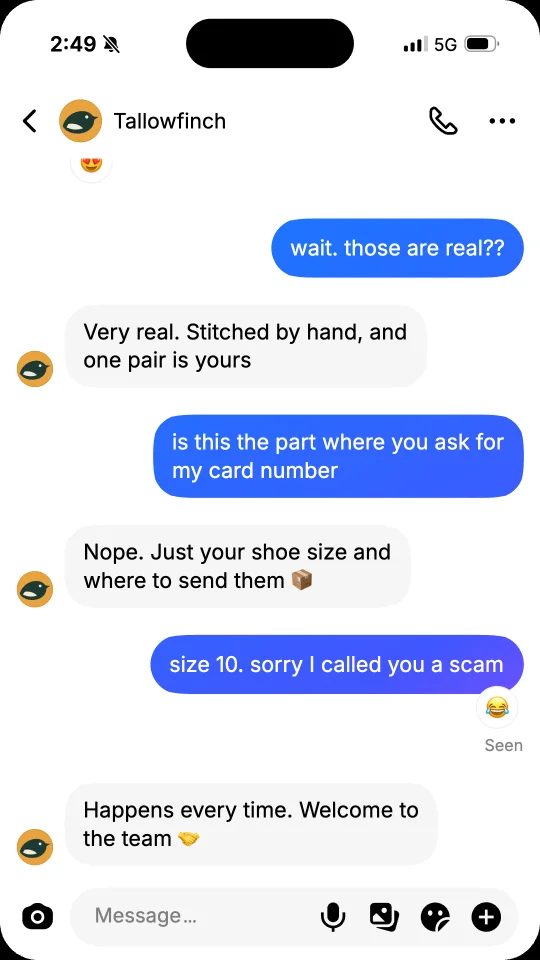
A small sneaker brand offers a collab to a creator with 3.2K followers, who is sure it is a scam. It is not. Made for brands and creators.
02 / What you can add
The details of a TikTok chat.
-
Profile card and top bar
A new chat opens on the profile card: a big photo, the name, and how many accounts it follows and how many follow it. The top bar keeps the photo and the name in view.
-
Bubbles from blue to purple
Their messages in round grey bubbles, yours in round bubbles that go from blue at the top of the screen to purple at the bottom.
-
Seen
Seen shows under the last message of yours they have seen. Turn it off in Settings and the chat never shows it.
-
Voice messages
A voice message with its play button, its waveform and its length, like 0:07.
-
Photos, emoji and reactions
Send a photo with its share button, a big emoji on its own, or put an emoji reaction under a message, theirs or yours.
-
Typing dots and times
While they type, three dots hop in a grey bubble. Times such as Today 2:47 PM, Yesterday or a date years ago sit between the messages.
03 / Ideas
What people make with a fake TikTok DM.
On TikTok, a DM read out loud over a screen recording is a format of its own.
-
Storytime videos
Tell how a DM from a stranger, a brand or an old friend went, message by message, then post it as a TikTok with your voice over it.
-
Creator and brand mockups
Show a collab request, a giveaway winner or a fan message in a pitch, a media kit or an ad, without sharing a real chat.
-
Skits and sketches
Write both sides of a joke or a sketch, with a reaction or a voice message for the punchline, then post the video.
-
Slides and lessons
Put a realistic TikTok DM in a slide, a design mockup or a lesson about online safety.
04 / How it works
Your TikTok DM in one minute.
-
Pick a template or start blank
Start from a ready-made TikTok chat, or from an empty one with a neutral profile.
-
Type it like a text
Tap Me or Them to switch sides. Add photos, voice messages, reactions, times and pauses. Set the name and photo of the profile, and its following and followers.
-
Save and post
Save a PNG screenshot, or a video sized for TikTok, stories and reels. On a phone, tap Share to post it or send it in a chat.
05 / FAQ
TikTok DM questions
How do I make a fake TikTok DM?
Tap Start free or pick a template. Type the messages like a text, and tap Me or Them to switch sides. Set the name and photo of the profile and its counts, then save the chat as a PNG screenshot or as a video. No account is needed.
Is this fake TikTok DM generator free?
Yes. Screenshots are free PNG images with no watermark, and you can download as many as you like. Videos are free too, with a small watermark and a short end card.
What can a fake TikTok chat show?
Text messages in round bubbles, yours from blue to purple, photos, voice messages, emoji reactions, big emoji on their own, times such as Today or Yesterday, the typing dots and Seen under your last message, in the light look of TikTok. A new chat opens on the profile card, with following and followers.
Can I change the followers and Seen?
Yes. In Profile, set the following and followers of the profile card, or tap Randomize. In Settings, turn Seen off and the chat never shows it; on, it shows under the last message of yours they have seen.
Can I make a video of a TikTok chat that already has messages?
Yes. In Settings, under Conversation, choose Ongoing: the older messages are already on screen when the video starts, and the new ones arrive one by one. Choose New for a chat that opens on the profile card.
Which sizes work for TikTok, stories and reels?
Story 9:16 for TikTok videos, stories and reels, Feed 4:5 and Square 1:1 for posts, all 1080 pixels wide. Screenshots are PNG images. Videos are MP4 with sound, or WebM on some browsers.
How do I make a fake TikTok DM look real?
Give the profile a photo and a name, set how many accounts it follows and how many follow it, and turn Seen on or off. Write short messages the way people text, add a time such as Today 2:47 PM between them, and set the clock of the status bar in Settings.
Is FakeDM.app made by TikTok?
No. FakeDM.app is an independent tool for making mockups, and it is not affiliated with, endorsed or sponsored by TikTok or ByteDance. What you make is a mockup, not a real message: do not use it to impersonate anyone, to fake evidence or to deceive people. See the acceptable use rules.